PocketGuard Review 2026: A Budgeting App Built Around One Number



Most budgeting apps want you to look at everything: categories, charts, spending limits, savings goals, debt projections and net worth. That’s powerful for people who like systems, but overwhelming for people who just want a quick read on whether they can grab lunch out today.
PocketGuard takes the opposite approach. Instead of building a full budget on top of your finances, it reduces your money picture to a single daily figure: how much you can safely spend without falling behind on bills or savings. That number — what PocketGuard calls In My Pocket — is the whole point of the product.
The question is whether one number is enough to justify a download, and whether the paid version at $74.99 per year is worth it compared with free options like Rocket Money or paid options like Monarch Money and YNAB. PocketGuard has a free version, but it’s narrow enough that most households will hit its limits quickly. (See our broader best budgeting apps guide for context on the field.)
We dug into the features, weighed the pricing tiers and pulled together a verdict for who should download it and who would do better elsewhere.
What Is PocketGuard?
PocketGuard is a budgeting app that calculates one number — your safe-to-spend total — by subtracting bills, savings goals and necessities from your available income.
The app connects to your bank accounts, credit cards and loans, then categorizes transactions automatically. Where most budget apps stop at category-level tracking, PocketGuard goes a step further and shows you a single figure, what’s “in your pocket.” The idea is that you don’t need to remember 14 budget categories — you just need to know whether spending today will hurt you tomorrow.
PocketGuard launched in 2014 and has since added subscription tracking, a machine-learning debt payoff plan and a lifetime subscription option that’s unusual in personal finance apps.
PocketGuard Plus: Is the Upgrade Worth It?
PocketGuard’s free version is too narrow for most households — it caps you at two linked accounts and two budget categories — but PocketGuard Plus at $74.99 per year is reasonably priced for what it unlocks.
When we tried it out, we downloaded the app and were never offered a free version, only a free trial. When we declined the paid version, we received an automated email about an hour later saying we had “unlocked” the free version with no need to start a free trial. But that free version has the same limitations as the free trial version.
The free version includes the basic “In My Pocket” calculation, transaction history and the two-account/two-category cap. That’s enough to test the app, but if you have a checking account, a credit card and a savings account — a fairly standard setup — you’ve already exceeded the free tier. (For free alternatives, see our roundup of the best free budgeting apps.)
Plus removes the caps entirely, so you get unlimited linked accounts, unlimited custom categories, the debt payoff plan, in-app subscription cancellation and push notifications for bill due dates and large transactions. Plus is $12.99 per month or $74.99 per year. PocketGuard also offers a lifetime subscription at $149.99, a one-time payment for permanent Plus access.
For most users, the annual plan makes more sense than monthly. The lifetime option may pay off if you can see yourself using PocketGuard for more than three or four years.
PocketGuard Features
PocketGuard’s feature set centers on the “In My Pocket” calculation and pairs it with automatic tracking, subscription monitoring and a Plus-tier debt payoff plan.
In My Pocket — The Safe-to-Spend Number
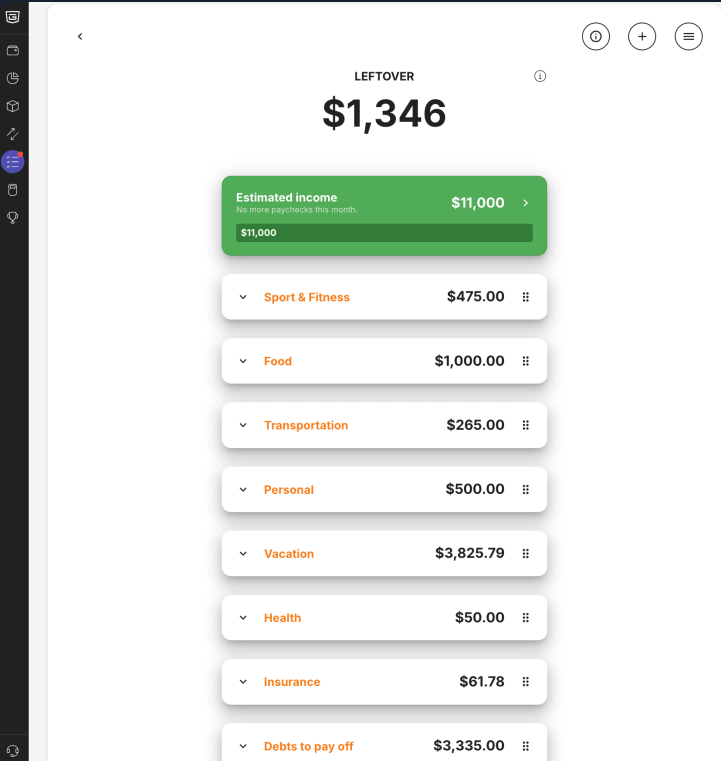
The In My Pocket feature is PocketGuard’s signature tool: a single number showing how much you can safely spend right now after bills and savings goals are accounted for.
The math is simple. PocketGuard adds up your monthly income, subtracts recurring bills and savings goals you’ve set, then divides what remains across the days left in your budget period. For example, if you earn $4,500 a month, have $2,800 in recurring bills, set $400 in monthly savings and there are 20 days left in the period, In My Pocket may show roughly $65 per day available.
That figure updates in real time as you spend. The simplicity is the point: Instead of checking a dozen category limits, you check one number.
Automatic Expense Tracking and Categorization
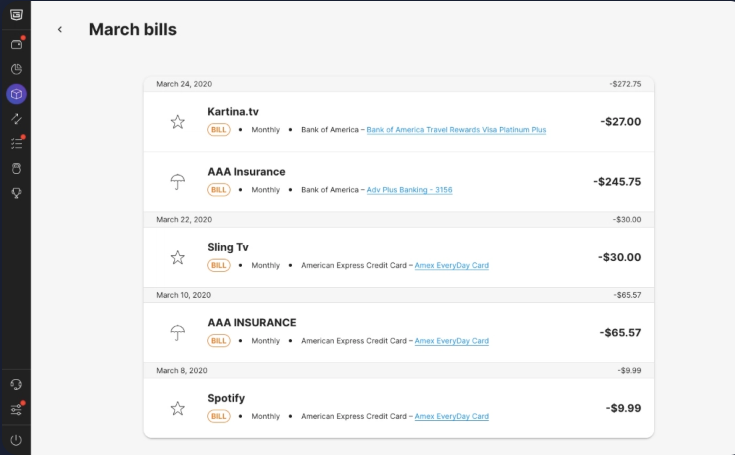
PocketGuard syncs with linked accounts and categorizes transactions automatically, but documented sync issues with several major banks may affect some users.
After you connect a checking account or credit card, PocketGuard pulls transactions on a regular sync schedule and sorts each one into a category. You can recategorize manually and set rules so recurring transactions sort the same way each time.
PocketGuard documents limited or broken connectivity with American Express, HSBC, Marcus by Goldman Sachs, Synchrony Bank, PayPal and most major Canadian banks. If your primary account is at one of these institutions, the app may require manual entry or workaround imports.
Budget Categories and Spending Limits
Budget categories let you set spending limits per area, but the free version caps you at two categories, while Plus offers unlimited custom categories.
PocketGuard’s default categories include groceries, dining, gas, utilities and entertainment, and you can build your own on the Plus tier. Each category carries a monthly spending cap that you can adjust, and the app warns you as you approach the limit.
Debt Payoff Plan (Plus Only)
The Plus-tier debt payoff plan uses your linked accounts to build a custom repayment schedule and project a payoff date — the feature most people upgrade for.
You link credit cards, student loans and other debt accounts, set how much extra you can put toward debt each month and PocketGuard generates a payoff timeline. The algorithm can use either the avalanche method (highest interest first) or the snowball method (smallest balance first), depending on your preference.
If debt payoff is your primary focus, this is the feature that may justify the upgrade on its own. For users without significant debt, it’s less compelling.
Subscription Tracking
PocketGuard scans your transactions for recurring charges and flags subscriptions you may have forgotten about, with the option to cancel them through the app on the Plus tier.
The free version shows you a list of detected subscriptions. The Plus tier adds in-app cancellation through a subscription management partner, which sends cancellation requests on your behalf. Results vary by subscription type — some may cancel instantly, others can require a phone call or written request.

PocketGuard Pros and Cons
PocketGuard’s strengths are simplicity, the lifetime pricing option and a usable debt payoff plan. Its weaknesses are a tightly capped free version and documented sync issues with several major banks. Here’s a look at the app’s pros and cons:
Pros
- Automated expense tracking and categorization
- In My Pocket gives one actionable daily number
- Lifetime subscription option for users who plan to stick around
- Debt payoff plan with avalanche or snowball methods
- Subscription detection plus in-app cancellation on Plus
Cons
- Free version caps at two accounts and two categories
- Documented sync issues with AmEx, HSBC, Marcus, Synchrony and PayPal
- No investment tracking
- Less customizable than YNAB or Monarch
- Monthly plan at $12.99 is expensive relative to annual or lifetime
Is PocketGuard Safe?
PocketGuard uses 256-bit encryption and read-only bank access through Plaid, so the app can see transactions but cannot move money. This is the same security standard most major personal finance apps use.
Account credentials aren’t stored on PocketGuard’s servers directly; Plaid handles authentication and refreshes tokens on a regular basis. You can revoke access at any time from the app or your bank’s website. PocketGuard also offers PIN and biometric protections (Face ID, Touch ID) on the app itself.
Any third-party app that links to a financial account carries some risk. Strong passwords, multi-factor authentication on the underlying bank accounts and periodic permission reviews can reduce that risk.
Who Is PocketGuard Best For?
PocketGuard is best for users who want a simple daily spending number without building a full budget — and especially for users focused on debt payoff or comfortable with the lifetime pricing model.
It’s best for:
- Users overwhelmed by category-heavy budget apps
- People paying down credit card or student loan debt
- Users who want one-time pricing instead of an ongoing subscription
- Households with simple banking setups (not at AmEx, HSBC or other listed banks)
It’s not ideal for:
- Users who want investment or net worth tracking
- Users who want strict zero-based budgeting (YNAB or EveryDollar may fit better)
- Couples wanting shared budgets (Monarch or Goodbudget may be better fits)
- Users at banks with documented sync issues
PocketGuard vs. Rocket Money
PocketGuard and Rocket Money both offer expense tracking and subscription detection, but Rocket Money’s free version is useful, while PocketGuard’s paid tier may be cheaper annually.
PocketGuard vs. Rocket Money
| Category | PocketGuard | Rocket Money |
|---|---|---|
Core feature |
“In My Pocket” daily spending number |
Subscription tracking and automated categorization |
Free tier |
Two accounts, two categories |
Unlimited accounts; basic budgeting |
Paid cost |
$74.99/year or $149.99 lifetime |
$4–$12/month (user sets price) |
Best for |
Debt payoff and one daily spending number |
Subscription audits and free tracking |
If you want a free tracker that’s usable on its own, Rocket Money may be the better fit. If you want a single daily spending number or are focused on debt payoff, PocketGuard can be the stronger pick. For a deeper comparison, see our Rocket Money review.
Frequently Asked Questions
PocketGuard has a free version, but it’s limited to two linked accounts and two budget categories — narrow enough that most users will need PocketGuard Plus to use the app meaningfully. Plus costs $12.99 per month, $74.99 per year or $149.99 for lifetime access.
PocketGuard is generally considered safe to use. It encrypts data with 256-bit encryption and connects to bank accounts through Plaid in read-only mode, meaning the app can view transactions but cannot move money. The app also offers PIN and biometric protections on your device.
The “In My Pocket” feature is PocketGuard’s signature tool. It calculates how much you can safely spend by subtracting bills, savings goals and category allotments from your available cash and showing the remainder as a single figure. The result updates in real time as you spend.
PocketGuard Plus may be worth paying for if you want unlimited accounts and categories, the debt payoff plan or the lifetime pricing option. If you only want basic expense tracking, free alternatives like Rocket Money are likely a better fit. The lifetime subscription at $149.99 can become attractive if you plan to use the app for several years.
PocketGuard’s strength is its “safe to spend” daily number and the debt payoff plan; Rocket Money’s strength is its free tier and aggressive subscription detection. PocketGuard Plus runs $74.99 per year; Rocket Money Premium uses a pay-what-you-can model from $4–$12 per month. The right pick depends on whether you want one daily number (PocketGuard) or broader free tracking (Rocket Money).