The Best Budgeting Apps of 2026: Free and Paid Options Compared


According to The Penny Hoarder’s State of Savings survey, 58% of Americans live paycheck to paycheck — and 48% save only what’s left after bills. A budgeting app can help you build a spending plan before your money disappears, instead of trying to figure out where it went after the fact.
Rocket Money is the best budgeting app for most people because it combines subscription tracking, automatic categorization and bill negotiation in one free-to-start app. But the right pick really depends on how you like to budget — whether you want maximum automation, strict zero-based control, shared access with a partner or just a free option that gets you started.
Below, we compare eight of the best budgeting apps of 2026 — including Rocket Money, Monarch and YNAB — by use case, pricing and features, so you can pick the one that actually fits your situation. We’ll answer all of these questions and more below.
About our methodology: We evaluate every app against a consistent set of criteria and then match the strongest performers to specific use cases, so you can find the app that best works for you. Read our full methodology here.
Quick Comparison: Best Budgeting Apps of 2026
Here’s a quick look at the eight apps in this roundup.
| Budgeting App | Price | Best For | Free Version |
|---|---|---|---|
| Rocket Money | Free; $7–$14/mo for Premium | Subscription tracking, all-in-one | Yes |
| Monarch Money | $14.99/mo; $99.99/yr for Core plan | Couples and full-picture tracking | No (7-day trial) |
| Piere | Free; $29.99/year for Piere Platinum | Set-and-forget savings | Yes |
| YNAB | $14.99/mo or $109/yr | Zero-based budgeting | No (34-day trial) |
| Cleo | Free; $5.99/mo for Plus | Fun, AI-chatbot engagement | Yes |
| Quicken Simplifi | $6.99.mo, billed annually | Beginners, light users | No (30-day money-back) |
| EveryDollar | Free; $17.99/mo or $79.99/yr for premium | Dave Ramsey followers, Baby Steps users | Yes (requires manual entry) |
| PocketGuard | $12.99/mo for Plus | Knowing what's safe to spend | Yes, but difficult to access |
| WalletHub | Free; $7.99/mo for Premium, $10.50/mo for Premium+, billed annually | Credit score monitoring/credit building | Yes |
Best Budgeting Apps by Use Case

Not every budgeter wants the same thing. Below, we’ve matched the best budgeting app to the most common use cases so you can self-select to the right fit. Each pick links down to that app’s full review in this guide.
Best Overall Budgeting App
Rocket Money the best budgeting app overall for its combination of automation, subscription tracking and simple budgeting tools. Most people can get value from the free tier, and the optional premium plan adds bill negotiation and unlimited budgets.
Best Free Budgeting App
Rocket Money’s free tier is the best free budgeting option, offering account syncing, subscription tracking and basic categorization at no cost. For a dedicated free-only comparison, see our guide to the best free budgeting apps.
Best Budgeting App for Set-and-Forget Savings
Piere learns your spending habits and lifestyle to help you set your goals once then let your savings grow automatically. You can also use Piere’s built-in AI to build your budget automatically, track spending, review subscriptions and find opportunities to save. The free version, Piere Purple, offers plenty of functionality to make it worth trying. If you want to try out its super-fast “two-tap budget,” you can try Piere Platinum for free for seven days, then $29.99/year.
Best Budgeting App for Zero-Based Budgeting
YNAB is the best zero-based budgeting app, with a system that requires you to assign every dollar of income to a specific category before you spend it. It has the steepest learning curve in this roundup, but it also produces the most dramatic results for users serious about debt payoff or breaking a paycheck-to-paycheck cycle.
Best Budgeting App for Couples
Monarch is the best budgeting app for couples, with shared account access, joint savings goals and customizable privacy settings for each partner. For a deeper look at couple-friendly options, see our guide to the best budgeting apps for couples.
Best Budgeting App for Beginners
Quicken Simplifi is the best budgeting app for beginners, with a clean interface, quick setup and a spending plan that adapts to your real cash flow rather than asking you to forecast everything up front. It’s a softer landing than the strictest zero-based apps.
Best Budgeting App for 50/30/20 Rule
Monarch is the best app if you’re using a percentage-based budgeting method like 50/30/20 or 60/20/20. It automatically categorizes your transactions into spending groups, which makes organizing simpler. And you can create custom groups and categories that fit the specific percentage structures.
Best Budgeting App for Dave Ramsey Followers
EveryDollar is the best budgeting app for Dave Ramsey followers and people using the Baby Steps debt payoff system, with a zero-based approach built around Ramsey Solutions’ financial principles. The free tier supports manual entry, and Premium adds bank syncing.
Best Budgeting App for Fun Engagement
Cleo is the best budgeting app for people who want a more engaging experience, with an AI chatbot that can deliver spending insights in a conversational format — including an optional ‘roast mode’ that pokes fun at your spending. It’s not for everyone, but for the right user it turns budgeting into something you actually open.
Best Budgeting App for Tracking Your Credit Score
WalletHub is the best budgeting app for those who are focused on building their credit and tracking their credit scores. Even with the free version, users can view their credit scores, full credit reports, get daily credit score and report updates, set credit score goals and make a credit improvement plan. The credit score perks come with solid budgeting, identity protection, and investment features, among others.
Individual Budget App Reviews
Rocket Money
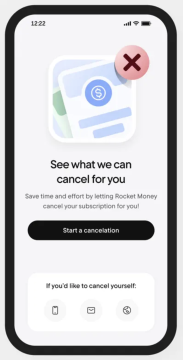
Rocket Money is a personal finance app that tracks subscriptions, monitors spending and helps lower recurring bills. Formerly known as Truebill, the app is now owned by Rocket Companies and has grown into one of the most-downloaded budgeting tools in the U.S.
What sets Rocket Money apart is how much you can do without paying. The free tier links your accounts, categorizes transactions and surfaces a list of recurring charges, including the streaming services and gym memberships you may have forgotten about. From there, you can request a one-tap cancellation for many subscriptions.
Premium adds bill negotiation (the app will try to lower your phone, internet or insurance bills on your behalf and take a cut of the savings if it succeeds), unlimited budgets, smart savings and credit-score tracking. Whether Premium is worth it depends largely on whether your bills are negotiable.
- Typical price: There is a free version, but Premium costs $7–$14 per month (you choose your price)
- Best for: Subscription tracking and bill negotiation
- Platforms: iOS and Android
- Free version: Yes
Pros:
- Subscription detection and one-tap cancellation requests
- Bill negotiation service may lower recurring bills
- Free tier is genuinely useful, not crippled
Cons:
- Premium price is variable, which can feel awkward
- Bill negotiation takes a percentage of savings
- Less powerful than YNAB for hands-on, zero-based budgeters
Read our full Rocket Money review.
Monarch Money
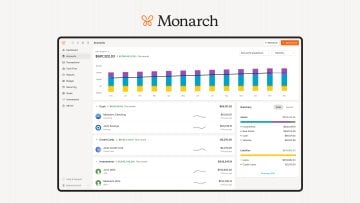
Monarch is a premium budgeting app built for couples and households that want one shared view of every account, goal and category.
Monarch was founded by a former Mint product lead and built specifically to fix the things Mint never solved, chiefly, real partner support and modern category management. Each member of a household gets their own login, with permission settings that let you decide what’s shared and what stays private.
The budgeting workflow is flexible rather than strict. You can set category targets, track progress against goals and use either a flex-month or zero-based approach — whichever fits how your household actually spends. Reporting is strong, and the goals feature is among the cleanest in the category.
- Typical price: $14.99 per month or $99.99 per year for its Core plan. Get 50% off your first year of the Core Plan with the code MONARCHVIP.
- Best for: Couples and households tracking everything together
- Platforms: iOS, Android and web
- Free version: No (7-day free trial)
Pros:
- Shared partner access with separate logins and privacy controls
- Strong net worth, goals and reporting features
- Flexible budgeting (not strict zero-based) suits most households
Cons:
- No free tier
- Investment tracking is lighter than Empower’s
- Setup can take time if you have many linked accounts
Read our full Monarch review.
Piere
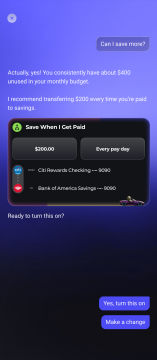
Piere uses AI to learn your spending habits and lifestyle to help you create a budget. You can chat with the agent to help you decide what your goals and money habits are, then connect to your accounts. You can also use Piere’s built-in AI to build a budget, track spending, review subscriptions, find opportunities to save more and keep everything in one place.
After a little trial and error, the app ends up being very intuitive when categorizing transactions, including Venmo transactions. And the free version offers plenty of functionality to make this a strong contender for a Mint replacement.
- Typical price: Free for Piere Purple or $29.99 per year for Piere Platinum
- Best for: Automated savings
- Platforms: iOS, Android and web
- Free version: Yes
Pros:
- Simple to use with slick interface
- Free version is robust enough to use on its own
- Tracks net worth
Cons:
- The two-click budget is only available with Piere Platinum
- No multi-user login for couples/families
- Takes some trial and error for accurate transaction categorization
YNAB (You Need a Budget)
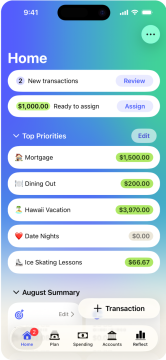
YNAB is a zero-based budgeting app that asks you to give every dollar of income a specific job before you spend it.
YNAB has built a cult following over more than 15 years, largely because users report it actually works — many say it’s the first budgeting tool that helped them break a paycheck-to-paycheck cycle. The system is built around four rules: give every dollar a job, embrace your true expenses, roll with the punches and age your money.
There’s a learning curve. Expect to spend a few hours getting set up and another week or two before the workflow feels natural. Once it does, most users either swear by it or move on — there’s not much middle ground. YNAB also offers free educational classes and an active user community to flatten the learning curve.
- Typical price: $14.99 per month or $109 per year
- Best for: Zero-based budgeting, debt payoff, behavior change
- Platforms: iOS, Android and web
- Free version: No (34-day free trial)
Pros:
- The most rigorous budgeting system in this roundup
- Strong reputation for helping users break paycheck-to-paycheck cycles
- Active community and free educational classes
Cons:
- Steepest learning curve in this roundup
- Requires consistent attention; not a ‘set it and forget it’ tool
- No couples-specific features built in
Read our full YNAB review.
Cleo

Cleo is an AI chatbot–driven budgeting app that delivers spending insights through conversational messages and offers an opt-in roast mode for users who want their bad habits called out.
Cleo is aimed squarely at younger users who find traditional dashboards boring or intimidating. Instead of a grid of categories, you chat with the bot — asking how much you’ve spent on takeout this month or whether you can afford to go out tonight — and it answers in plain language.
The free tier covers spending insights and basic budgeting. Cleo Plus adds features like cash advances and a credit-builder card. If the chat-style interface clicks for you, Cleo can be the difference between checking in daily and never opening the app at all.
- Typical price: There is a free version, but Plus costs $5.99 per month
- Best for: Younger users who want budgeting to feel less like a chore
- Platforms: iOS and Android
- Free version: Yes
Pros:
- Conversational interface lowers the barrier to checking in
- Personality-driven tone keeps engagement high
- Free tier covers core spending insights
Cons:
- Less detailed than spreadsheet-style apps
- Tone may not appeal to every user
- Some features (cash advance, salary advance) require paid tiers
Read our full Cleo review.
Quicken Simplifi
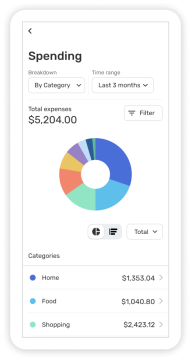
Quicken Simplifi is a beginner-friendly budgeting app from Quicken that builds a spending plan that adjusts to your real cash flow, instead of forcing you to budget every category up front.
Simplifi’s spending plan starts with your income and recurring bills, automatically subtracts savings goals and shows you what’s left to spend. As the month progresses, the number adjusts based on your real activity. You don’t have to forecast every category in advance.
It’s a softer landing than YNAB or EveryDollar for people who want structure without the homework. The trade-off is depth: Simplifi is less powerful for advanced reporting and investment tracking, and there’s no free tier. The 30-day money-back guarantee is the closest thing to a no-risk trial.
- Typical price: $6.99 per month, billed annually (Though there is a 50% discount at the moment, which brings the monthly total to $3.49.)
- Best for: Beginners and light-touch budgeters
- Platforms: iOS, Android and web
- Free version: No (30-day money-back guarantee)
Pros:
- Lower price than most premium apps
- Quick setup with a clean, less-intimidating interface
- Spending plan adapts as the month progresses
Cons:
- No free tier
- Less powerful than YNAB or Monarch for advanced users
- Limited investment tracking
EveryDollar
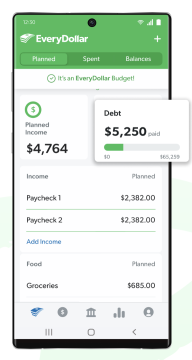
EveryDollar is a zero-based budgeting app from Ramsey Solutions designed around Dave Ramsey’s Baby Steps system.
EveryDollar’s appeal is built on familiarity and simplicity for people who already follow Ramsey’s principles: debt snowball, fully funded emergency fund, retirement savings and so on. The app’s category structure mirrors the Baby Steps, and Premium subscribers get access to group coaching content through Ramsey+.
If you’re not already a Ramsey follower, EveryDollar can still work as a zero-based tool, but YNAB tends to be more flexible and feature-rich for the same use case. The free tier requires manual transaction entry. It’s perfectly usable, but there’s a notable difference from the auto-syncing competition.
- Typical price: There is a free version, but Premium costs $79.99 per year or $17.99 per month
- Best for: Dave Ramsey, Baby Steps followers
- Platforms: iOS, Android and web
- Free version: Yes , but bank sync requires Premium
Pros:
- Clean interface that mirrors Ramsey’s pencil-and-paper approach
- Tight integration with Baby Steps and Ramsey+ coaching content
- Free tier works if you don’t mind entering transactions manually
Cons:
- Bank sync requires Premium, the free tier is manual
- Best fit for people who follow Ramsey’s specific philosophy
- Fewer features than YNAB for advanced zero-based budgeters
Read our full EveryDollar review.
PocketGuard
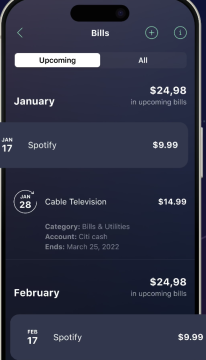
PocketGuard is a budgeting app with an In My Pocket feature that shows you exactly how much is safe to spend after bills, goals and necessities are accounted for.
The In My Pocket number is the entire pitch: Instead of forcing you to interpret a complex dashboard, the app gives you a single figure representing what you can spend without falling behind. For users who chronically wonder “Can I afford this?” before every purchase, that one number is the whole game.
Plus tiers add custom categories, debt payoff plans, savings goal tracking and unlimited budgets. PocketGuard’s lifetime Plus pricing is unusual for budgeting apps — you pay once instead of subscribing — though the upfront cost is higher.
- Typical price: There is a free version but it’s not advertised (we were only offered it after we turned down a paid plan). The Plus plan costs $12.99 per month or $74.99 per year. A lifetime subscription costs $99.99
- Best for: Users who want a clear “safe to spend” number every day
- Platforms: iOS and Android
- Free version: Yes
Pros:
- In My Pocket is one of the easiest answers to “Can I spend this?” in any app
- Free tier covers the core feature
- Lifetime Plus pricing is rare in this category
Cons:
- Less depth than YNAB or Monarch on category-level reports
- Some users find the interface dated
- Plus monthly price is on the higher end
Read our full PocketGuard review.
WalletHub
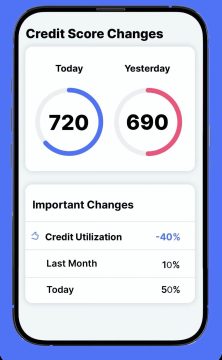
In its app, WalletHub combines budgeting tools with credit monitoring, debt payoff planning and a broader financial-health score.
WalletScore is the standout feature: It evaluates your credit, spending, emergency preparedness and retirement readiness to give you a more complete picture of your finances.
WalletHub combines customizable budgeting tools with credit monitoring, debt payoff planning and a broader view of your financial health.
The all-in-one approach is the main appeal: You can sync financial accounts, automatically categorize transactions and choose from five budgeting styles, including simple, pay-yourself-first, envelope, micro-envelope and 50/30/20 budgeting. WalletHub also tracks your credit score, net worth, subscriptions and savings goals, making it especially useful if debt and credit improvement are part of your budget.
A free account includes budgeting and credit-monitoring tools, while Premium adds or expands certain budgeting, credit and identity-protection features.
- Typical price: Free; Premium costs $7.99 per month and Premium+ costs $10.50 per month billed annually, with a 30-day money-back guarantee
- Best for: Users who want budgeting and credit monitoring in one app
- Platforms: Web, iOS and Android
- Free version: Yes
Pros:
- Offers five budgeting methods
- Combines budgeting, credit scores, debt payoff planning and net-worth tracking
- Automatic account syncing, transaction categorization and subscription tracking
- Free version offers more than a basic manual budget
Cons:
- Product recommendations can be distracting
- Users who only want straightforward budgeting may find the extra tools unnecessary
How to Choose a Budgeting App
The best budgeting app for you depends on whether you want automation, zero-based discipline, couples features or a free option. Walk through the four factors below and you’ll usually land on the right pick within a couple of minutes.
Start with your budgeting style. If you want a system that controls spending in advance, zero-based budgeting (YNAB or EveryDollar) gives you the most structure. If you’d rather track spending after the fact and adjust, an automation-first app (Rocket Money, Monarch, Simplifi) is a better fit. If you’re not sure, WalletHub offers five different budgeting methods you can try.
Next, consider whether you have a partner to budget with. If yes, Monarch’s shared-access design is purpose-built for that. Apps like YNAB and EveryDollar can be shared but weren’t designed with two-login households in mind.
Then think about your comfort with manual input. If you don’t mind entering transactions, EveryDollar’s free tier is fully usable. If you’d rather link your accounts and let the app do the work, almost everything else in this roundup syncs automatically.
Finally, set a realistic budget for the app itself. Free options exist (Rocket Money, EveryDollar manual, Cleo, PocketGuard) and premium options run $6–$15 per month. The right answer is the one you’ll actually use; for most people that’s worth more than saving a few dollars on the app itself.
If you’re brand new to budgeting in general, start with our guide to budgeting for beginners before committing to a paid app — building the habit matters more than picking the perfect tool.
Are Budgeting Apps Worth It?
Budgeting apps are worth paying for if they help you spend less, cancel unused subscriptions or build consistent saving habits. For users who already track everything in a spreadsheet and rarely overspend, the value is smaller — but most people don’t fall into that category.
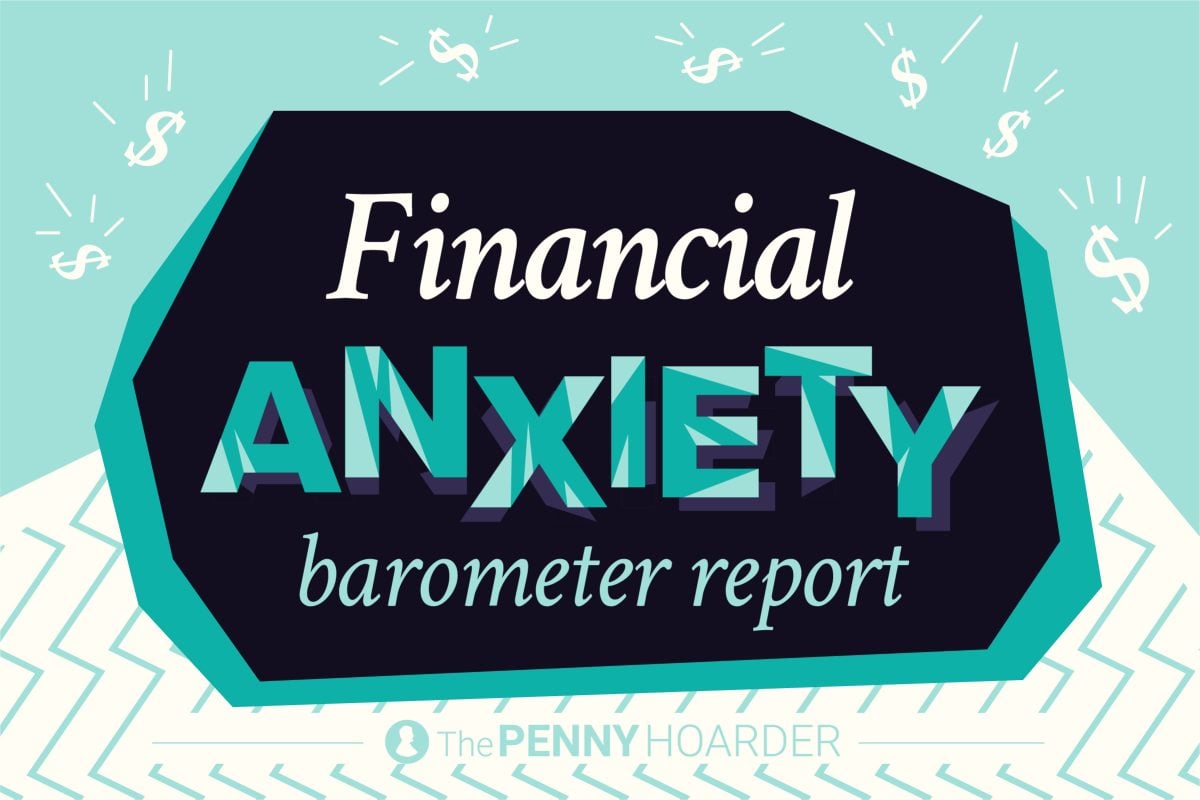
According to The Penny Hoarder’s State of Savings survey, 48% of Americans save only what’s left after bills — a budgeting app can help flip your mindset to save first. It can also help quell financial stress, something Americans desperately need these days. According to our Financial Anxiety Barometer survey, 43% of Americans worry about finances several times a week and only 14% feel in control of their finances.
Even free tiers can move the needle when they surface forgotten subscriptions or show you a real cash-flow picture for the first time.
Are Budgeting Apps Safe?
Most budgeting apps are safe and use bank-grade encryption, but linking financial accounts always carries some risk. The major apps in this roundup use read-only connections through aggregators like Plaid, which means the app can see your transactions but cannot move your money.
Use strong, unique passwords, enable two-factor authentication on both your bank and the app, and review each app’s privacy policy before connecting your accounts. Privacy policies can change — check the current version on each app’s website. If an app or feature requires write access (like initiating a transfer), make sure you understand what permission you’re granting.
Frequently Asked Questions: Best Budgeting Apps
Rocket Money is widely considered the best free budgeting app because its free tier covers account syncing, basic categorization and subscription tracking — the features most users actually need. EveryDollar’s free tier and Cleo’s free tier are also strong picks depending on your style.
YNAB is better for users who want strict, zero-based budgeting and are willing to spend time managing categories. Rocket Money is better for users who want automation, subscription tracking and a free starting point. They’re built for different jobs.
Mint shut down in March 2024. Empower is the closest free replacement for users who also want investment tracking. Rocket Money and Monarch are the most common replacements for users who only want budgeting and spending insights.
Quicken Simplifi tends to be the easiest for total beginners thanks to its quick setup and simple spending plan. Rocket Money is also easy to start with because its free tier requires almost no configuration. Cleo’s chat-style interface can feel easier for users who find traditional dashboards intimidating.
Yes. Monarch is purpose-built for couples with separate logins and shared accounts. YNAB and EveryDollar support shared use through a single account or paid family plans. For a closer look, see our guide to the best budgeting apps for couples.
EveryDollar offers a free tier, but it requires manual transaction entry. Bank syncing, custom reports and other automation features require EveryDollar Premium ($79.99 per year or $17.99 per month).
Yes. EveryDollar is built by Ramsey Solutions specifically around the Baby Steps system, so the workflow mirrors Dave Ramsey’s recommended order of debt payoff, emergency fund, retirement saving and beyond. If you already follow the Baby Steps, EveryDollar is the most natural app fit. Read our full EveryDollar review for a deeper look.
About our methodology: We evaluate every app against a consistent set of criteria and then match the strongest performers to specific use cases, so you can find the app that best works for you. Read our full methodology here.