Copilot Money Review 2026: Is It the Best Budgeting App for iPhone?



If you’re an iPhone user shopping for a budgeting app, you’ve probably noticed that most of the popular options look like spreadsheets in disguise. Copilot Money has spent the last few years building a reputation as the antidote — a budgeting app that actually feels good to open on your iPhone, iPad or Mac.
It’s also one of a handful of apps with serious AI under the hood. Copilot’s transaction categorization learns from your corrections over time, and it pulls investment accounts into the same dashboard as your checking, savings and credit cards. The catch? Copilot’s app is iOS-only. There is no Android app; however, it launched a web version in December 2025.
At $13 per month or $95 per year, Copilot is priced slightly less than Monarch Money and YNAB. So how does it actually stack up — and is it worth the price for the right kind of user?
We’ll answer all of these questions and more below.
What Is Copilot Money?
Copilot Money is a premium budgeting app that was previously exclusively available on iOS — iPhone, iPad, and Mac — until it added web app access in December 2025. It uses AI to automatically categorize transactions, track spending trends and monitor investment accounts. It costs $13 per month or $95 per year and is widely considered the best-designed budgeting app for Apple users.
Founded in 2020, Copilot was built natively for Apple devices from day one rather than ported over from a web app. That design philosophy shows up in the small details: native widgets, Apple Watch support, Siri shortcuts, and a clean interface that rewards regular check-ins instead of punishing you with clutter.
As of March 2026, the web app is much more limited but does feature updated transaction filtering and transaction metrics. It still lacks the iOS features like a goals tab, cash flow tab and month/year in review. Your subscription gives you access to Copilot Money across all platforms.
Where most budgeting apps lean on rule-based category matching, Copilot uses an AI engine that improves as you correct it. Over a few weeks of use, the app typically learns your patterns and stops miscategorizing the obvious stuff. It’s a small thing that compounds over months of tracking.
Copilot Money Features
Copilot Money’s core features include AI-powered transaction categorization, spending trends, investment tracking, net worth tracking, monthly category budgets, recurring transaction detection, and full Apple ecosystem integration. Many of the features are only available on iOS, not the web-based app. Here’s how each one works in practice.
AI transaction categorization
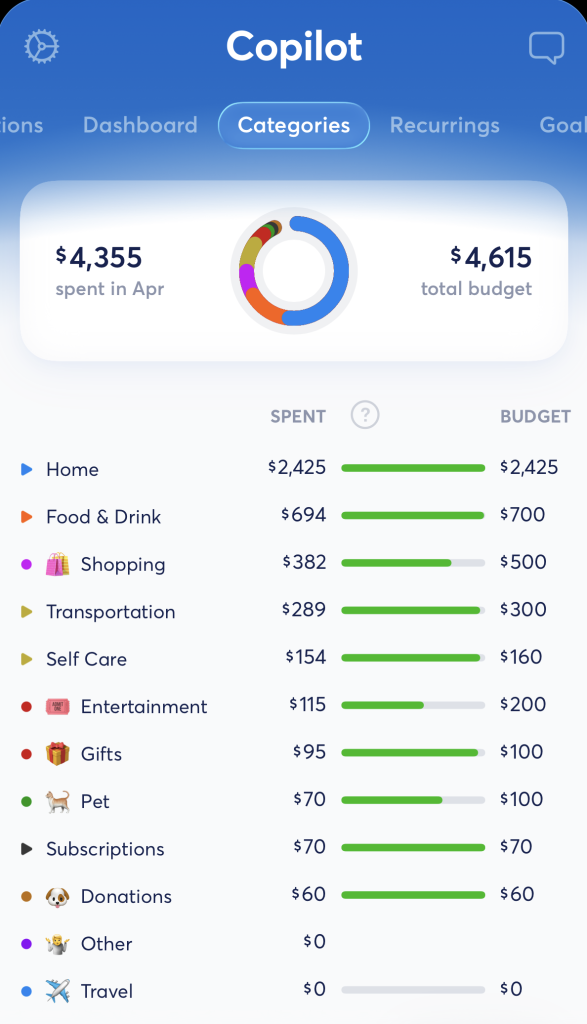
Copilot’s auto-categorization is its strongest differentiator. Each time you correct a category, the app learns and applies that correction going forward. Most users report that after two to three weeks of use, the manual work nearly disappears — a noticeable upgrade over apps that rely on static rules.
Spending trends
Copilot shows month-over-month and year-over-year spending breakdowns by category, with clean visualizations that make trends jump off the screen. It’s especially useful for catching seasonal patterns — like the way grocery spending creeps up around the holidays — that monthly budgets alone can hide.
Investment tracking
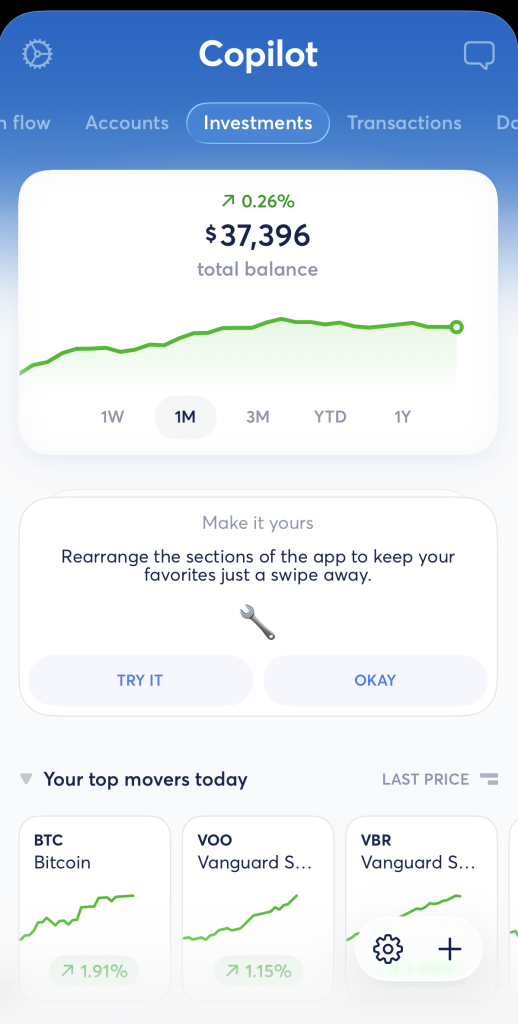
Copilot links brokerage accounts, 401(k)s and IRAs for a portfolio overview alongside your bank accounts. The visuals are cleaner than what you’ll find in Empower’s free dashboard, though the underlying analysis isn’t as deep. If you want one app for both budgeting and high-level investment tracking, Copilot covers it.
Net worth tracking
All your linked accounts roll up into a real-time net worth figure that updates daily. You can see the trend over time and drill down by account type — useful for tracking progress toward big goals like a debt payoff date or a down payment.
Budgets and recurring transactions
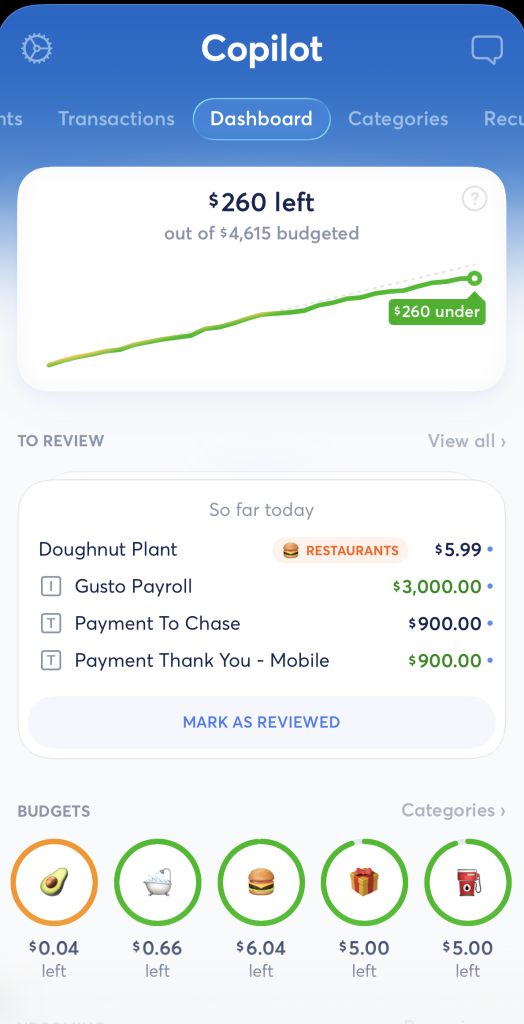
Set monthly budgets per category with visual progress indicators that show you where you stand mid-month. Copilot also auto-detects subscriptions and recurring charges, which can help you spot a forgotten streaming service before it auto-renews for another year.
Apple ecosystem integration
This is the feature that won’t matter to most apps’ users but matters a lot here. Copilot offers native iOS widgets, Apple Watch glances, Siri shortcuts and Mac support. If you live inside Apple’s ecosystem, the result feels more like a first-party app than a third-party tool.
How Much Does Copilot Money Cost?
Copilot Money costs $13 per month or $95 per year, with a one-month free trial available for new users. There is no free tier — Copilot is subscription-only.
Compared with the rest of the premium budgeting apps, Copilot is priced slightly less than Monarch Money ($14.99 per month or $99.99 per year for its Core plan — get 50% off your first year of the Core Plan with the code MONARCHVIP) and YNAB ($14.99 per month or $109 per year). It’s about double the cost of Quicken Simplifi, which runs $6.99 per month, billed annually (though it often offers discounts).
If you’re new to budgeting apps and not sure whether you’ll stick with one, the free trial is the lowest-risk way to test Copilot before committing to a year. We were offered a month-long free trial in April 2026, but verify the current offer in the App Store before downloading.
Copilot Money Pros and Cons
Copilot Money’s biggest strengths are its design, its AI categorization and its tight Apple integration. Its biggest weaknesses are its iOS-only availability (and a more limited web version), its premium price, and a feature set that skips a few things power users may want.
Pros:
- Best-in-class iOS design and user experience
- AI categorization that learns and improves over time
- Strong investment and net worth tracking included
- Full Apple ecosystem support — Watch, widgets, Siri, Mac
- Regular feature updates and active development
- Clean, uncluttered interface that’s easy to check daily
Cons:
- iOS only — no Android app, but there is a web version
- No free tier; subscription required after the trial
- More expensive than Quicken Simplifi (about $13/month vs. $6.99)
- No zero-based budgeting support
- No joint or couples multi-login feature
- No bill negotiation or subscription cancellation tools
Who Is Copilot Money Best For?

Copilot is best for iPhone and Mac users who want a premium, beautifully designed budgeting app with strong AI categorization and investment tracking. If you use Android, Copilot is only available as a web app — Monarch Money and Empower are the closest app alternatives.
The users who tend to get the most out of Copilot are Apple power users who already lean heavily on iCloud, Apple Cash and Apple Watch; design-conscious users who want a tool they actually enjoy opening; and former Mint users who held investment accounts and didn’t want to give up the all-in-one dashboard view.Copilot is probably not the right pick if you use Android (there isn’t a specific app — it’s only available on the web), if you want a free tier, if you and a partner need joint access from separate logins, or if you’re set on a strict zero-based budgeting workflow. For a broader look at the field, see our roundup of the best budgeting apps.
Is Copilot Money Available on Android?
The Copilot Money app is not available on Android. The app is built exclusively for iPhone, iPad, and Mac, and there is no Android app or Google Play release planned that the company has publicly announced. The company did announce that Copilot Money was available on the web as of December 2025. Your subscription gives you access to Copilot Money across all platforms.
The web app’s design is very similar to the sleek iOS app version, but it’s less convenient accessing from the web, particularly on mobile devices. The web version also lacks some of the iOS features, including the helpful demo mode and month/year in review.
Android users looking for a similar premium budgeting experience in a dedicated app should consider Monarch Money (available on iOS and Android) or Empower (free, available on both platforms). For more options, see our Monarch Money review or Empower app review.
Copilot Money vs. Monarch Money
Copilot and Monarch are similarly priced premium budgeting apps with strong investment tracking and AI categorization. Monarch adds couples and joint access and is available on Android, while Copilot has a more polished UI and stronger Apple ecosystem integration.
Copilot Money vs. Monarch Money
| Feature | Copilot Money | Monarch Money |
|---|---|---|
Monthly price |
$13 |
$14.99 |
Android support |
No (iOS only app, only web app access) |
Yes |
Couples / joint access |
No |
Yes |
AI categorization |
Advanced (learns) |
Basic |
Apple Watch app |
Yes |
No |
Investment tracking |
Yes |
Yes |
Free tier |
No (30-day trial) |
No (7-day trial) |
Pricing may change — verify directly with the app. Offers change; verify terms.
If you’re on Android or share a budget with a partner, Monarch likely wins by default. If you’re an Apple-only household and care about how the app looks and feels, Copilot is the more enjoyable daily driver.
Copilot Money vs. YNAB
Copilot is better than YNAB for passive tracking and beautiful data visualization. YNAB is better for zero-based budgeting and users who want to manually assign every dollar of income before they spend it. Both cost about $14 per month.
These two apps reflect very different philosophies. YNAB is a system you actively work — you sit down, give every dollar a job, and adjust as the month unfolds. Copilot is more of an observation tool — it tracks what’s happening and surfaces insights, but it doesn’t push you to plan ahead the way YNAB does.
If you’re paying off debt aggressively or trying to break a paycheck-to-paycheck cycle, YNAB’s structure may help more. If you already have decent habits and just want a clear view of your money, Copilot may be the easier daily companion. See our YNAB review for a deeper look.
Final Verdict
Copilot Money is the right pick for iPhone, iPad, and Mac users who want a premium, beautifully designed budgeting and net worth app — and who are willing to pay $13 per month for it. The AI categorization and Apple ecosystem support are genuine differentiators, not marketing fluff.
It’s not the right pick if you’re on Android (the app simply isn’t available, although it’s available on the web), if you want a free tier, or if you need joint access for a partner. You can expect to settle in after a couple of weeks once the categorization has learned your patterns, but results vary based on how often you check in.
If you’re new to budgeting apps and starting from scratch, see our guide to budgeting for beginners before you commit to a paid app.
Copilot Money Review Frequently Asked Questions
Yes. Copilot uses 256-bit encryption and read-only connections with data aggregators like Plaid and Finicity to link your accounts. It does not store your bank credentials on its own servers. It cannot move money out of your accounts. As with any aggregator, use a strong password and enable two-factor authentication on your linked institutions.
No. Copilot is subscription-only at $13 per month or $95 per year. A free trial is available for new users — historically 30 days, but verify the current trial length in the App Store before downloading.
It depends on your style. Copilot is better for passive tracking, beautiful visuals and AI-driven categorization. YNAB is better for hands-on, zero-based budgeting where you assign every dollar of income to a category before you spend it. Copilot Money costs a couple dollars less per month than YNAB.
Copilot was built as a native iOS app from the ground up, prioritizing deep Apple ecosystem integration over cross-platform availability. In December 2025, the company launched a more limited web version, allowing you to use it on a PC. But the web app is not optimized for mobile devices. Android users should check Monarch Money or Empower for similar functionality in a budgeting app.