EveryDollar App Review 2026: Is Dave Ramsey’s Budgeting App Worth It?



Stretching a paycheck is becoming more and more difficult. With rising grocery bills, forgotten subscription charges and the steady weight of debt, it’s no wonder so many people are searching for a simple way to keep tabs on every dollar coming in and going out.
The EveryDollar app, from Dave Ramsey’s Ramsey Solutions, aims to help you do that. It uses a zero-based budgeting approach — every dollar of income gets a job before the month begins — and it recently got a refresh. In January 2026, Ramsey Solutions relaunched the app with new features, including a tool called Margin Finder that the company says can surface hundreds of dollars in spending you may not realize you have.
But is the app actually worth your time? And if you do try it, do you need to pay for the Premium version, or can the free tier handle the job?
We’ll walk through what EveryDollar offers in 2026, how the free and Premium tiers compare, what the relaunch added, what it costs, who tends to get the most out of it and how it compares to other top apps like Monarch Money and YNAB. We’ll answer all of these questions and more below.
What Is the EveryDollar App?

EveryDollar is a zero-based budgeting app from Ramsey Solutions, the company founded by personal finance author Dave Ramsey.
The app’s core philosophy is simple: at the start of each month, you assign every dollar of expected income to a category. That usually includes bills, groceries, savings, debt payoff and fun money. You put every dollar in a category until your income minus your planned spending equals zero. The idea is that you can’t accidentally overspend money you’ve already given a job to. It’s the same zero-based method Ramsey teaches alongside his Baby Steps framework for paying off debt and building wealth.
EveryDollar is available on the web, iOS and Android, and it runs on both a free tier and a paid Premium tier. In January 2026, Ramsey Solutions relaunched the app with new tools — most notably the Margin Finder feature — and a more guided, coaching-style experience for Premium subscribers.
If you’re new to the concept, it can help to start with the basics of budgeting for beginners before deciding whether a structured zero-based system is the right fit.
EveryDollar Free vs. Premium: What’s the Difference?
EveryDollar offers two tiers: a free version with manual budgeting tools and Premium, which adds bank sync, the new Margin Finder feature, paycheck planning, budget insights, live group coaching and a personalized financial roadmap.
The free tier covers the basics — you can build a zero-based budget, track categories, and use it across web and mobile. Premium handles more of the work for you and adds coaching content built around the Baby Steps framework. As of April 2026, Premium is $79.99 per year or $17.99 per month, with a 14-day free trial.
Free
- Manual transaction entry
- Build a zero-based budget
- Basic budget categories
- Track monthly spending against the plan
Premium
- Everything in Free, plus:
- Bank connectivity
- Paycheck planning for variable income
- Goal setting
- Margin finder
- Budget insights and trend reports
- Live group coaching from Ramsey coaches
- Smart tracking recommendations
- Financial roadmap tied to the Baby Steps
- 14-day free trial
The right tier for you mostly depends on how much manual entry you’re willing to do and whether the coaching features matter to you. Many users start on the free tier to test the zero-based method before deciding whether to upgrade.
EveryDollar 2026 Relaunch: What’s New?
The January 2026 EveryDollar relaunch added a Margin Finder tool, personalized financial roadmaps, short daily lessons and live group coaching for Premium subscribers.
Margin Finder is the headline feature of the relaunched EveryDollar. Ramsey Solutions reports that the average new user can find $3,015 of margin — money currently leaking out of the budget — in about 15 minutes by walking through guided prompts about subscriptions, recurring bills and spending habits. However, results vary by household, and the figure comes from Ramsey Solutions’ internal data, not an independent study.
Other features added or expanded in the 2026 relaunch include:
- Personalized plans tied to where you are in the Baby Steps
- Daily lessons and short videos that reinforce zero-based budgeting
- Live group coaching sessions led by Ramsey Solutions financial coaches
- Updated paycheck planning and budget insights for variable-income households
If you tried an older version of EveryDollar and bounced off it, the 2026 experience may feel meaningfully different — especially on the Premium side.
How Does EveryDollar Work?
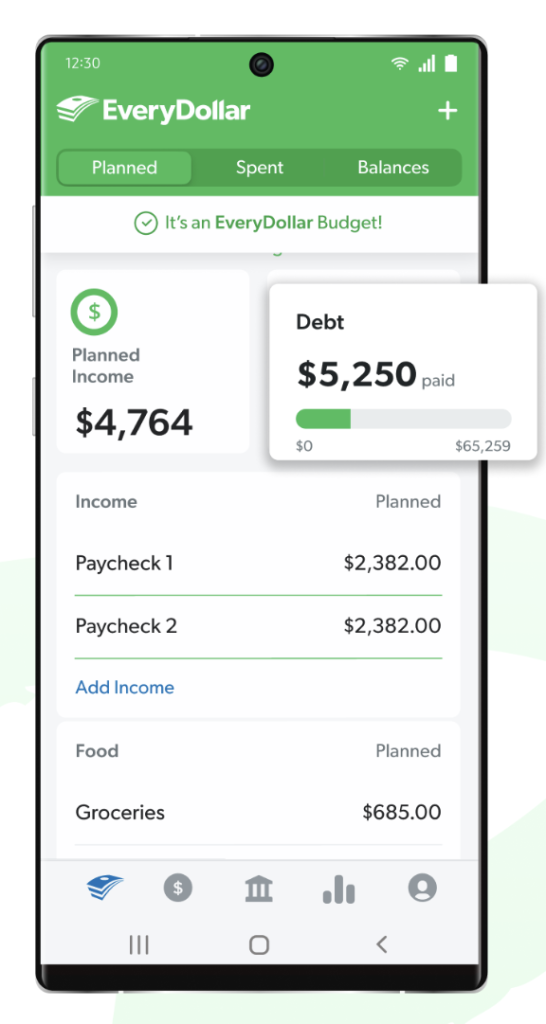
EveryDollar walks you through a four-step zero-based budgeting workflow each month: enter your income, assign every dollar to a category, track spending in real time and reconcile what you actually spent against your plan.
Here’s what the process tends to look like in practice:
- Enter your expected monthly income from all sources, including any side gigs or variable pay.
- Assign every dollar of that income to a budget category — rent, utilities, groceries, debt payments, savings goals, giving and so on — until income minus planned spending equals zero.
- Track spending as it happens. On the free tier, you log transactions manually. On Premium, the app can sync directly with your bank and pull transactions in automatically.
- Reconcile at the end of the month and use what you learned to plan next month’s budget.
The free tier can work well if you want to slow down and notice every transaction. The Premium tier is better suited for people who want the automation and don’t have time for daily manual entry.
How Much Does EveryDollar Cost?
EveryDollar is free to download with basic features. Premium costs $79.99 per year or $17.99 per month, with a 14-day free trial.
Premium is bundled with some Ramsey Solutions memberships for users who already pay for Ramsey+ courses or coaching.
The free tier may be enough if you’re comfortable manually entering each transaction. Premium is what you’re paying for if you want bank sync, Margin Finder, paycheck planning and the live group coaching that came with the 2026 relaunch.
Is EveryDollar Safe?
Yes, EveryDollar uses bank-grade 256-bit encryption and read-only bank connections, meaning the app can see your transactions but cannot move money out of your accounts. But as with any app that connects to your bank, you should still use a strong, unique password and enable two-factor authentication where available.
User-experience reports are more mixed than the security picture. As of April 2026, EveryDollar holds roughly a 4.7-star rating on the Apple App Store, while reviews on Google Play are more uneven (4.3), with some Android users reporting crashes, sync glitches and slower updates. If you primarily use Android, it may be worth reading recent reviews before committing to a paid annual plan.
EveryDollar Pros and Cons
EveryDollar has a clean, beginner-friendly interface and a strong methodology behind it, but the free tier is fairly limited and the experience leans heavily on Dave Ramsey’s broader teachings.
Pros
- Clean, beginner-friendly interface
- Built-in Dave Ramsey Baby Steps integration
- Free tier is genuinely usable for manual budgeters
- Strong zero-based budgeting methodology
- 14-day Premium free trial
- Live group coaching included with Premium
- Margin Finder helps surface forgotten spending
Cons
- Bank sync requires Premium
- Free tier means manual entry only
- Best suited for Dave Ramsey followers
- Android experience reported as less polished
- Limited investment account tracking
- May feel rigid for irregular-income users
Most of the strongest features — bank sync, Margin Finder and live group coaching — sit behind the Premium paywall. That doesn’t make the free tier useless, but it does mean you’ll do more of the work yourself if you stay on it. Offers change; verify terms.
Who Is EveryDollar Best For?
EveryDollar tends to work best for Dave Ramsey followers, zero-based budgeting beginners and people who want a guided plan tied to clear monthly steps.
If you already follow the Baby Steps — or you want to — the app is built around that framework. Beginners who feel overwhelmed by open-ended budgeting tools often appreciate that the app tells you what to do next instead of leaving every category up to you.
It’s less of a fit for people with highly irregular income, those who like flexibility or users who want investment account tracking inside the same app. The Android experience can also be more inconsistent than iOS, based on recent user reviews.
Many people land on EveryDollar while they’re trying to get out of debt. If you’re in that bucket, pairing the app with a debt-payoff plan may help you put the “margin” the app finds toward your highest-interest balances. Results vary, and these services typically have fees and credit-score implications, so verify terms before enrolling.
If you’re still weighing options, our roundup of the best budgeting apps compares EveryDollar to other top tools, and our guide on how to save money has practical ideas for building up your emergency fund.
EveryDollar vs. YNAB vs. Monarch Money
EveryDollar, YNAB and Monarch Money are three of the most popular budgeting apps in 2026, and they take notably different approaches to managing your money. We’ve also included Rocket Money in the comparison below as an editorial alternative for readers who want help cancelling subscriptions and negotiating bills rather than building a strict zero-based budget.
Quick comparison
| App | Price | Free Tier | Budgeting Method | Best For |
|---|---|---|---|---|
EveryDollar |
Free or $79.99/yr ($17.99/mo) |
Yes |
Zero-based budgeting |
Dave Ramsey followers and beginners |
YNAB |
About $14.99/mo or $109/yr |
No (34-day trial) |
Rules-based zero-based |
Detail-oriented power users |
Monarch Money |
About $14.99/mo or $99.99/yr |
No (7-day trial) |
Category tracking + net worth |
Couples and net-worth tracking |
Rocket Money |
Free or about $7–$14/mo (you choose) |
Yes (limited) |
Spend tracking + bill negotiation |
Cancelling subscriptions and negotiating bills |
In short: EveryDollar is the most opinionated of the four and is a strong fit if you like the Baby Steps framework. Our YNAB review covers a more rules-based zero-based system that many power users prefer, and our Monarch Money review walks through a tool focused on net-worth tracking and shared household finances. Rocket Money is the odd one out here — it’s less of a budgeting app and more of a money-management tool, but worth a look if subscription bloat is your real problem.
EveryDollar Frequently Asked Questions
EveryDollar offers a free tier with manual budget creation, category tracking and access on web and mobile. Premium features such as bank sync, Margin Finder and live group coaching require a paid subscription, currently $79.99 per year or $17.99 per month with a 14-day free trial. Offers change; verify terms.
EveryDollar Premium can connect with most major U.S. banks and credit unions through a read-only data partner, similar to other budgeting apps. Smaller institutions, some credit unions and certain prepaid accounts may not be supported, and connections can occasionally drop and need to be re-linked. You can verify whether your specific bank is supported at everydollar.com.
No, but the app is clearly designed around Dave Ramsey’s Baby Steps and zero-based budgeting philosophy. You can use EveryDollar without following the Baby Steps, but readers who don’t enjoy Ramsey’s broader teachings on debt, investing or credit cards may find the coaching content less useful.
Yes — EveryDollar Premium supports shared accounts so two partners can view and edit the same household budget from separate devices. The free tier also lets two people log in with the same credentials, though without bank sync. Results vary based on how each couple splits responsibilities.
Both apps use zero-based budgeting, but EveryDollar leans more heavily on guided coaching tied to Dave Ramsey’s Baby Steps, while YNAB emphasizes a strict rules-based system and a steeper learning curve. EveryDollar also offers a free tier; YNAB does not.
Final Verdict
EveryDollar is a solid zero-based budgeting app, especially after the 2026 relaunch added Margin Finder, daily lessons and live group coaching. It’s most useful for Dave Ramsey followers, zero-based budgeting beginners and households that want a clear monthly plan rather than an open-ended dashboard.
Realistic expectations help: the free tier requires manual entry, the most powerful features sit behind Premium, and Android users have reported a less polished experience than on iOS. Results vary by user, and the $3,015 “margin” figure comes from Ramsey Solutions’ own data.
If the Baby Steps approach speaks to you, EveryDollar is worth a try — start with the free tier or the 14-day Premium trial before committing to an annual plan.