The 5 Best Free Budgeting Apps of 2026


Rocket Money is the best free budgeting app overall, offering basic budgeting tools, subscription tracking and limited spending categorization at no cost — but Empower, Cleo and EveryDollar each win for specific use cases. “Free” on this page means a permanent free tier, not a free trial. Apps like YNAB and Monarch Money offer trials but are not free apps, so they aren’t included here.
A free app can lower the barrier for those struggling to build a budget — something that is fairly common. More than half of Americans say they are living paycheck to paycheck, according to The Penny Hoarder’s State of Savings survey. A low-cost way to reorganize spending is a good place to start if you’re in this situation.
Plus, after Mint shut down in March 2024, many users started hunting for a no-cost replacement. The four apps below all have permanent free tiers that may handle the basics — track spending, set goals, monitor accounts — without requiring an upgrade.
About our methodology: We evaluate every app against a consistent set of criteria and then match the strongest performers to specific use cases, so you can find the app that best works for you. Read our full methodology here.
Quick Comparison: The Best Free Budgeting Apps
This table covers the four apps at a glance. Each has a permanent free tier with optional paid upgrades.
| App | Best For | Free Tier Features | Upgrade Cost |
|---|---|---|---|
| Rocket Money | Best free overall | Basic budgeting tools, subscription tracking | $7–$14/mo Premium |
| Cleo | Beginners and Gen Z | AI chatbot, spending insights | $5.99–$14.99/mo |
| Empower | Investment tracking | Retirement planning, budgeting | Free (Wealth Mgmt is separate, $100K+ min) |
| EveryDollar | Dave Ramsey followers | Manual zero-based budgeting | $17.99/mo or $79.99/yr |
| WalletHub | Credit score monitoring/credit building | Credit score tracking, manual budgeting, identity protection | $7.99/month for Premium, $10.50/month Premium+, billed annually |
Rocket Money — Best Free Budgeting App Overall
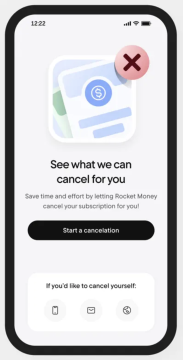
Rocket Money’s free tier is a feature-rich budgeting app, giving you basic budgeting tools, subscription tracking, limited spending categorization and net income tracking without paying anything.
The subscription tracking feature alone, which automatically detects and monitors recurring charges, can be the kind of tool that surfaces forgotten streaming services and trial conversions that quietly drain a budget. For users who want the most features at $0, this is the strongest pick.
Premium runs about $7 to $14 a month and unlocks custom categories, an unlimited budgeting feature and Rocket Money will cancel unwanted subscriptions for you.
Another popular feature is bill negotiation. That is available to you for a fee, regardless of if you use the free or premium tier. The bill negotiation team can reach out to cable, internet and phone providers on a user’s behalf, and the savings may offset the additional cost, which is based on a percentage of the savings.
Pros:
- Subscription tracking is free
- Access to financial education learning tab
- Easy setup — typically takes under 10 minutes
Cons:
- Bill negotiation requires a fee
- Custom categories require Premium
- Not a true zero-based budgeting tool
Read our full Rocket Money review for the full feature breakdown.
Cleo — Best Free App for Beginners

Cleo’s free tier is the most engaging budgeting experience available at no cost, using an AI chatbot to surface personalized spending insights in a conversational format that many beginners can find easier than a traditional budget tracker.
Instead of staring at a spreadsheet-style dashboard, Cleo users text a chatbot that responds with spending breakdowns and actionable suggestions. For Gen Z users, beginners or anyone who has bounced off pricier tools because the interface felt clinical, Cleo’s tone may be the differentiator that makes the budget actually get checked.
The free tier covers spending insights, budget tracking and savings goals. Cash advance features and voice chat require an upgrade. Cleo Plus runs $5.99 a month, Pro $8.99 a month and Builder $14.99 a month.
Pros:
- Conversational interface lowers the friction of checking in
- Free tier covers core budgeting features
- Gamified savings goals can build habits
Cons:
- Cash advance and credit-builder features are paid
- Tone may not appeal to every user
Read our full Cleo app review, and consider it alongside other budgeting for beginners resources.
Empower — Best Free App for Investment Tracking
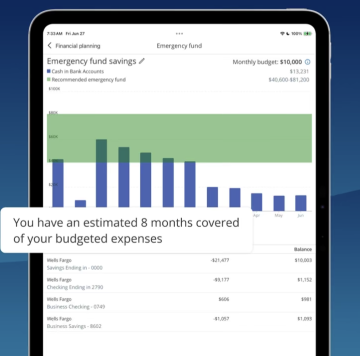
Empower is the best free budgeting app for people with investment accounts — it syncs 401(k), IRA and brokerage accounts alongside spending data at no cost, which makes it the rare zero-cost app that tracks a fuller financial picture.
This is the key clarification users often miss: Empower’s personal finance tools — budgeting, investment tracking, retirement planner and net worth — are all available at no cost. Empower also offers a Wealth Management service that requires a $100,000 minimum to invest, but that’s a completely separate product from the personal finance tools, and it isn’t required to use the free app.
For users who had Empower (which merged with Personal Capital in 2020) linked to a Mint account, this is the closest free replacement that keeps the investment view intact. Day-to-day spending categorization is functional but less detailed than what Rocket Money or Cleo provide, so some users pair Empower with another app for daily category tracking.
Pros:
- Investment tracking at no cost
- Strong retirement planning projections
- Whole-financial-picture view in one dashboard
Cons:
- Spending tracker less detailed than other apps
- Wealth Management sales calls may follow signup
Read our full Empower app review for setup details.
EveryDollar — Best Free App for Zero-Based Budgeting
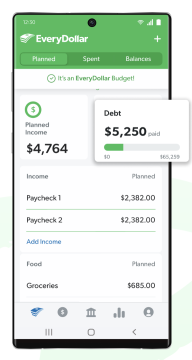
EveryDollar’s free tier lets users do full zero-based budgeting with manual entry at no cost — it’s the best free option for Dave Ramsey followers or anyone who wants the discipline of ZBB without paying for bank sync.
The free version requires manual transaction entry, which sounds like a downside but is closer to what Ramsey actually recommends. Typing in transactions forces a moment of intentionality with each one. For households new to budgeting, the smaller feature footprint may also be easier to stick with than a more complex app.
EveryDollar Premium is $79.99 a year and adds bank sync and custom reports. Premium pricing can land higher than Rocket Money’s monthly Premium, so the free version is often the right starting point.
Pros:
- Free tier includes full zero-based budgeting
- Unlimited custom categories at no cost
- Aligns with Ramsey Baby Steps for users following that plan
Cons:
- Bank sync is paywalled
- Manual entry takes more time than auto-sync apps
Read our full EveryDollar app review, and see our zero-based budgeting guide for the method.
WalletHub — Best Free App for Credit Score Monitoring
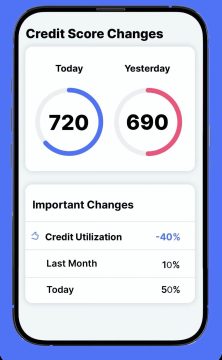
WalletHub combines free budgeting tools with credit monitoring. You can manually create a budget, track spending and choose from five methods, including envelope budgeting, pay yourself first and the 50/30/20 approach.
Its biggest differentiator is credit tracking. Free members get daily TransUnion credit-score updates, credit reports, monitoring and personalized improvement tips, making WalletHub a strong choice for users who want to manage their budget and credit in one place.
WalletHub Premium costs $7.99 per month billed annually and adds automatic account syncing, subscription management, savings goals, net-worth tracking, spending alerts and other financial and identity-protection tools. Premium+ offers even more features at $10.50/month, billed annually.
Pros:
- Multiple budgeting methods
- Free daily credit updates
- Budget and credit tools in one app
Cons:
- Automatic syncing requires Premium
- Many advanced tools are paid
- Uses VantageScore, not FICO
What Happened to Mint?
Mint shut down in March 2024 after Intuit discontinued the app — for users who relied on Mint, Rocket Money and Empower are the closest free alternatives.
Rocket Money is the strongest direct replacement for Mint’s day-to-day spending and subscription tracking, and the free tier covers most of what Mint provided without an upgrade. Empower is the better choice for users whose Mint dashboard included investment accounts; its 401(k), IRA and brokerage tracking are still entirely free, while preserving the all-accounts-in-one-place experience that drew many users to Mint in the first place.
Are Free Budgeting Apps Safe?
Free budgeting apps are generally safe when they use read-only bank connections — they can view account activity but can’t move money — and all four apps on this list use read-only connections.
Most reputable apps connect through Plaid or a similar service that handles the bank credentials behind the scenes, so the budgeting app itself never sees a username or password. Users may want to enable two-factor authentication on the email tied to the account, use a strong unique password and review linked accounts periodically. No connection is risk-free, but the read-only structure means even a compromised account wouldn’t allow funds to be moved out.
Free vs. Paid: When Is It Worth Upgrading?

A free budgeting app is worth upgrading when the upgrade pays for itself or unlocks a feature critical to a financial goal. Rocket Money’s bill negotiation may pay for itself in most cases, and a paid plan like YNAB can be worth it for aggressive debt payoff.
For households with five or more recurring subscriptions, upgrading Rocket Money to negotiate or cancel them can recoup the cost. Households committed to zero-based budgeting with auto-sync may find YNAB or Monarch worth the spend, even though neither is free. See our roundup of the best budgeting apps for paid alternatives, and how to stick to a budget for the behavioral side of making any budget last.
Frequently Asked Questions
Rocket Money is the best completely free budgeting app for most people because it offers subscription tracking and spending categories without ever requiring a paid plan. Empower is the best free option for users with investment accounts to track.
Most budgeting apps offer a free tier alongside paid upgrades. Empower is the closest to a fully free app — all of its personal finance features (spending, investment tracking, retirement planner) are free, with no budget features locked behind a paywall. The paid Wealth Management service is a completely separate product.
Mint shut down in March 2024. The best free replacements are Rocket Money (best for subscription tracking and spending overview) and Empower (best for users who had investment accounts linked to Mint).
For basic budgeting — tracking spending, setting goals, monitoring accounts — free apps are typically equally effective. Paid apps like YNAB and Monarch can earn their cost through full zero-based budgeting with auto-sync, joint accounts for couples and dedicated debt payoff tools. If you’re starting out, it can make sense to start free and upgrade if you outgrow it.
Some do. Rocket Money allows multiple linked accounts and can be used by couples sharing finances. For the best couples-specific features (shared goals, joint budget view, privacy settings per partner), Monarch Money is the strongest option — though it requires a paid plan.
Final Verdict
Rocket Money wins as the best free budgeting app overall thanks to a free tier that includes subscription tracking, net income tracking and spending categories. Empower is the right pick for users with investment accounts, Cleo for beginners and EveryDollar for zero-based budgeters. Meanwhile, for credit score monitoring and credit building, WalletHub is the best choice.
None of these apps require a paid plan to start. Most users may find one of the four fits without ever needing to upgrade. Ultimately, the best free budgeting app is the one that gets opened more than once. Pick the interface that fits how you think — and start tracking this week.
About our methodology: We evaluate every app against a consistent set of criteria and then match the strongest performers to specific use cases, so you can find the app that best works for you. For the best free budgeting apps, we weighted how much value you get for $0. Read our full methodology here.