Quicken Simplifi Review 2026: Is It the Best Budgeting App for Beginners?



Budgeting app comparison shopping can feel exhausting. Many of us aren’t looking for portfolio analytics or zero-based budgeting puritanism — we just want to know where the money goes, what’s safe to spend and which bills are about to hit.
Quicken Simplifi keeps showing up on “best budgeting app for beginners” lists in 2026. It’s cheap relative to the rest of the paid-app pack, runs on iOS and Android, and it has a feature called the Spending Plan that takes some of the guesswork out of “can I afford this?”
But Simplifi isn’t right for everyone. We’ll cover what Simplifi does well, what it doesn’t, how it stacks up against Monarch Money and YNAB, and who should actually sign up.
What Is Quicken Simplifi?
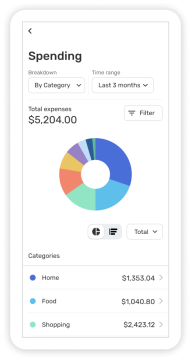
Quicken Simplifi is a budgeting app that launched in 2020 as Quicken’s mobile-first alternative to its legacy desktop product. You connect your accounts, Simplifi imports transactions, and the app generates a real-time picture of your cash flow without requiring you to manually assign every dollar a job.
It’s aimed at beginner-to-intermediate budgeters who want clean tracking, bill reminders and a clear “what can I spend?” number — not power users who need deep portfolio reporting or multi-year planning.
Simplifi Features
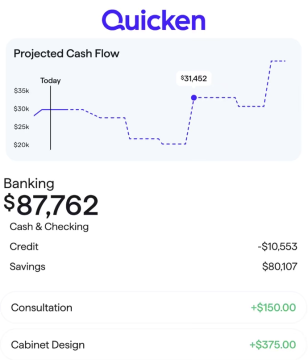
Simplifi’s core feature set covers budgeting, projected cash flow, savings goals, and retirement planning — and the standout is the Spending Plan, which updates every time a transaction posts.
- Spending Plan: It subtracts bills, scheduled transfers and savings goals from your projected income, then shows what’s safe to spend for the rest of the month. This is the single biggest differentiator from category-only budgeting apps.
- Watchlists: Customizable alerts that flag overspending in user-defined categories or merchants like DoorDash or Amazon. Useful for behavior nudges without committing to a strict envelope system.
- Goals & Savings: Set savings goals with progress tracking and projected completion dates. Goals can be linked to specific accounts so progress updates automatically.
- Bill & Subscription Tracking: Detects recurring charges and projects upcoming bills against expected cash flow. It can also surface subscriptions you may have forgotten about.
- Investment Tracking: Links brokerage, 401(k), and IRA accounts for net worth and high-level performance.
- Credit Score Monitoring: Keep an eye on your credit and get tips on how to improve it.
- Refund Tracking: Add the details of a refund so you don’t forget about it. This is uncommon among competitors and genuinely useful.
- Customizable Dashboard: Reorder widgets — cash flow, top spending, upcoming bills, net worth — to surface the data you check most.
Offers change; verify terms.
How Much Does Simplifi Cost?
Quicken Simplifi is a paid subscription with no permanent free tier, and pricing tends to change. Verify the current monthly and annual rates directly at quicken.com before signing up.
As of mid-2026, it’s $6.99 per month on annual billing, but could be less if a promotional rate is active.
There is no traditional free trial in 2026. Quicken offers a 30-day money-back guarantee that can function like one — you can subscribe, use the app and request a refund within 30 days if it isn’t a fit. Offers change; verify terms.
If pricing is the deciding factor, our best free budgeting apps guide covers genuinely free alternatives.
Simplifi vs. Quicken Classic
Simplifi and Quicken Classic are different products from the same company — Simplifi is a mobile and web app for everyday budgeting, while Quicken Classic is a downloadable desktop application for Windows or Mac built for power users.
The two products serve different audiences. Simplifi is mobile-first. Quicken Classic stores data locally on your computer and is geared toward detailed reporting and multi-year planning.
Quicken Classic is typically the better pick for small-business owners, landlords with rental properties, or anyone who wants full local data control and doesn’t mind a learning curve. Simplifi is the better pick for simple budgeters who want clean automation and access from their phone. They are sold as separate subscriptions.
Simplifi Pros and Cons
The biggest knock on Simplifi is the cost; the biggest win is the Spending Plan feature.
Pros
- The Spending Plan feature is unique
- Affordable paid-tier pricing in 2026
- Clean, beginner-friendly interface with minimal learning curve
- Refund tracking
- Strong bill and subscription detection
- Customizable dashboard with recent updates
- Available on iOS, Android, and the web
- 30-day money-back guarantee
Cons
- No permanent free tier
- No free trial
- Investment tracking is lighter than Empower or Monarch
- No zero-based or envelope-style budgeting
- No built-in debt-payoff strategies like snowball or avalanche
- Pricing has changed multiple times — verify before committing
Offers change; verify terms.
Who Is Simplifi Best For?

Simplifi is best for simple budgeters — beginners to intermediates — who want automated tracking, bill reminders and a clean dashboard at a low paid-tier price in 2026. It’s not the right choice for serious investors, strict zero-based budgeters or anyone who wants a fully free app.
Simplifi tends to be a strong match if you are:
- A solo earner new to budgeting who wants a low-friction starting point
- An ex-Mint user looking for a low-price replacement following its shutdown in 2024
- Someone who wants passive tracking with light behavioral nudges rather than strict envelope control
Simplifi is probably not the right fit if you:
- Have complicated finances
- Are a dedicated zero-based budgeter — YNAB is built for that workflow
- Are a user who wants deep investment analytics — Empower offers strong free portfolio tools
If you’re earlier in your money journey, our budgeting for beginners guide walks through the fundamentals before any app comes into the picture.
Simplifi vs. Monarch Money
Simplifi is the cheaper pick for simple budgeters; Monarch Money is the better choice for households that prioritize shared access — Simplifi lets you share your “space” with one person. Both offer automated tracking and investment dashboards, but Monarch has deeper portfolio detail and joint-account features, while Simplifi has a more focused, beginner-friendly Spending Plan.
Simplifi vs. Monarch Money
| Feature | Simplifi | Monarch Money |
|---|---|---|
Monthly price |
$6.99/mo billed annually (outside of promos) |
$14.99/mo |
Free tier |
No (30-day money-back) |
No (7-day trial) |
Platforms |
iOS, Android, Web |
iOS, Android, Web |
Couples / joint access |
Allows shared “spaces” with one person |
Yes (shared login on one plan) |
Budgeting style |
Spending Plan (cash flow) |
Flex or category-based |
Investment tracking |
Basic |
Stronger |
Best for |
Solo beginners on a budget |
Couples & households |
For a fuller breakdown of Monarch’s feature set, see our Monarch Money review. Offers change; verify terms.
Simplifi vs. YNAB
Simplifi is better for passive tracking and beginners; YNAB is better for zero-based budgeting and behavior change. Simplifi tells you what’s safe to spend based on your real cash flow, while YNAB requires you to actively assign every dollar a job before you spend it.
The choice usually comes down to how hands-on you want to be. Simplifi is the lower-effort option that still gives you structure — automatic categorization, projected cash flow and a “safe to spend” number that updates as you go. YNAB is the higher-effort option that can change spending behavior faster because it forces you to plan for each dollar before it leaves your account.
If you’ve tried YNAB and bounced off the manual workflow, Simplifi can feel like a relief. If you want budgeting to actually rewire your habits and don’t mind the work, our YNAB review covers what to expect.
Is Simplifi Safe and Legit?
Yes — Simplifi uses read-only connections to financial institutions via Plaid and other aggregators, 256-bit encryption, and two-factor authentication. The app can’t move money between or out of your accounts; it can only read transaction data.
The app is published by Quicken Inc., which has been operating in personal finance software for more than 40 years. That long corporate track record is part of why Simplifi tends to score well on trust signals in 2026.
As with any aggregator-based app, the safest practice is to enable two-factor authentication, use a unique password and review the list of connected institutions periodically.
Simplifi Review Frequently Asked Questions
No — Simplifi is a paid subscription with no permanent free tier. Quicken offers a 30-day money-back guarantee, which can function as a risk-free trial. Verify current pricing at quicken.com. Offers change; verify terms.
No. Simplifi is a mobile and web app aimed at everyday budgeting, while Quicken Classic is a downloadable desktop application aimed at power users. They are sold separately.
Yes — Simplifi runs in any modern web browser through Quicken’s sign-in. There is no installable desktop application. The iOS and Android apps cover phone and tablet use.
For solo users who want automated tracking and don’t mind paying, Simplifi is one of the closest paid Mint alternatives in 2026. If you want a free Mint alternative, Empower is a strong free option.
Final Verdict
Quicken Simplifi is a strong pick for solo budgeters who want automated tracking and a clean “what can I spend?” view without paying the higher prices of Monarch or doing the manual work YNAB requires. The Spending Plan feature is useful, and the price tends to land at the low end of the paid-app tier.
Families should look elsewhere — the single shared space limitation is real, and Monarch Money handles shared access more cleanly. Power users who want deep investment analysis or full local data control will want Quicken Classic or a portfolio-first tool instead.
If Simplifi’s strengths match what you actually need from a budgeting app, the 30-day money-back guarantee makes it low-risk to try. Verify current pricing at quicken.com before subscribing.